- 好友
- 1
- 在线时间
- 9803 小时
- 最后登录
- 2026-11-4
子爵[版主]
游小明
 枢机主教 枢机主教
 
- UID
- 74938
- 第纳尔
- 12338
- 精华
- 3
- 互助
- 129
- 荣誉
- 102
- 贡献
- 172
- 魅力
- 565
- 注册时间
- 2008-4-28

 鲜花( 1297)  鸡蛋( 0)
|
本帖最后由 aliang227 于 2026-7-2 18:39 编辑
前言
各位MODDER应该都知道,骑砍的dialogs很难用,绕来绕去。有时候只是想简单加一些线性对话,但跳来跳去特别混乱,对话较多的时候也不利于批量。我这里重写了一个大地图线性对白系统,解决这个问题。
初次添加可能有点绕,不过相信我,加一次之后,后面用起来会很方便的。附带了excel工具,按教程填入文本就可以自动生成代码了,当然,对白的条件和结果块还是得自己手动写下,但是也会方便不少。其实规则说清楚,连上述代码生成都可以通过AI来了,不过古法编程的还是可以用excel来做的。
一直想贡献出来但是没啥时间弄,试着用AI帮了下忙,结果还不错,大家可以看看AI写的教程咋样,哈~ 内容很长,但实际上复制粘贴几下就完事了。各种图像资源也是用的战团自带的,有需要可以自行修改presentation。
代码可以自由取用,注明来源即可,想自己修改,比如中间加几个按钮,将线性对白更改为分支对白的,都可以自由调整。
大致功能描述
以上次更新说明为参考:
由于骑砍自带的那个对话系统很绕很难用,不适宜批量生成;NPC对话的对象主体几乎都是玩家,每次对话发生时,玩家几乎都只能得知结果,而非过程。如弹出对话李四告诉你他喜欢张三,讨厌王娇娇,玩家只知道这件事情发生了,而当时的情形要么不知道,要么只能听到转述;再者有些对白,如入队,喜爱讨厌对话,看过几次之后,一般都是鼠标狂点跳过了,有时专注于干某件事情,如追击或逃命时,一个对话出来玩家会觉得厌烦而只想跳过。基于如上几个因素,加入了大地图对白系统。
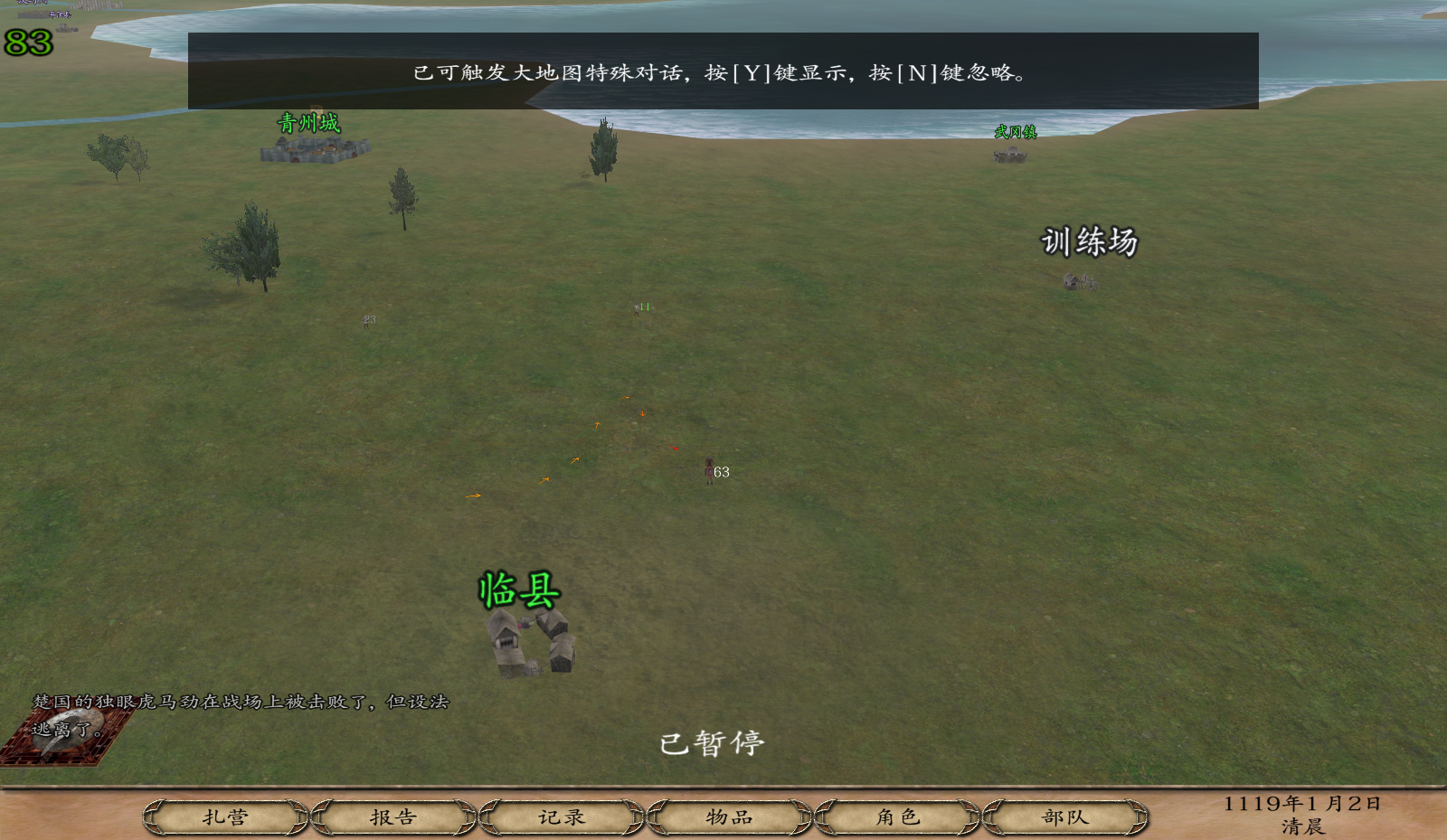
▲ 玩家在大地图行走时,会有不影响操作的提示窗口,显示有特殊对话可触发,玩家可按Y键查看,或按N键跳过
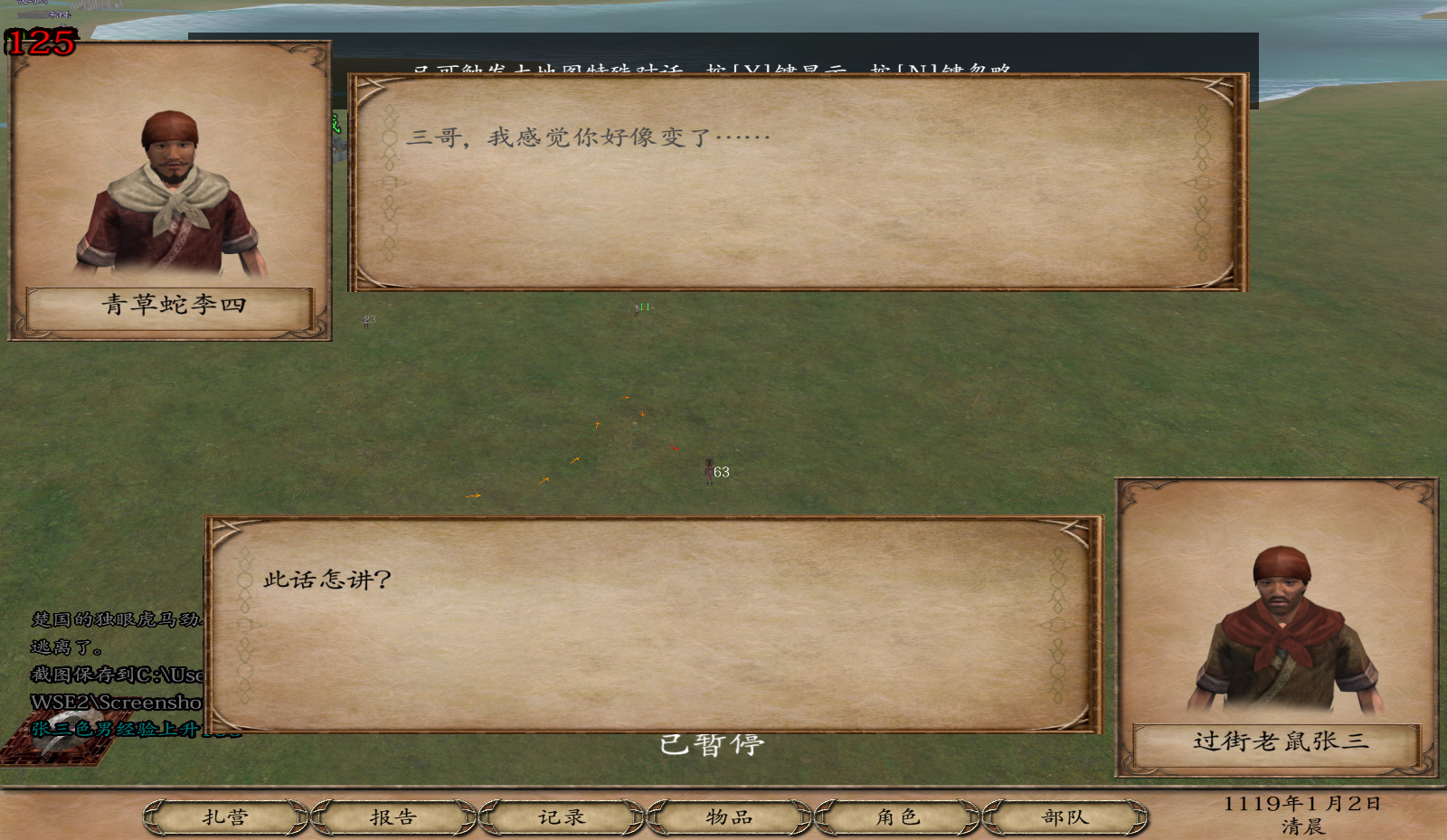
▲ Y键查看时,对白会直接显示在大地图中,而N键跳过也完全不会影响本身可能产生的结果
▲ 初步加入了百余段对白片段,主要涵盖了酒馆NPC的互动、野外NPC入队后的互动(如祝氏三杰团聚)、酒馆NPC与入队领主的互动(如武松武大)、提拔NPC的互动、以及部分NPC的专属装备获取任务及提示
▲ 对白完成会有诸多影响,如互相关系上升下降、属性上升、职业经验、适性经验上升,甚至称号获取等等,如果看过一次,或对于对白剧情不感冒的汽油直接按N跳过也不会影响这些加成的获取,同时也伴有提示
▲ 加成有多有少,有的也完全没有,主要目的还是为了丰富角色,使其生动起来,不仅仅是属性、职业、特技等等的区别,还更像一个伴随玩家战斗的同伴。
|
实际效果图示
大地图对白系统 - MOD移植教程
乱舞水浒MOD 大地图对白功能 · 通用移植指南
目录
- 一、功能概述
- 二、系统架构总览
- 三、前置依赖项
- 四、常量定义
- 五、全局变量
- 六、核心脚本-通用部分
- 七、核心脚本-可定制部分
- 八、触发器
- 九、Presentation展示界面
- 十、字符串与汉化
- 十一、Excel模板工具-快速生成代码
- 十二、快速上手-添加第一个对话
- 十三、自定义扩展指南
- 十四、附录-完整引用关系图
一、功能概述
1.1 是什么
大地图对白系统是乱舞水浒MOD中的一项功能,允许在大地图界面上自动触发角色间的对话,以精美的 Presentation 形式展示。 |
1.2 核心优势
- 无需进入场景:直接在大地图上展示,不打断游戏流程
- 双角色对话:上下双头像 + 名字标签 + 对话气泡,沉浸感强
- 多轮翻页:支持多轮对话,鼠标左键点击翻页
- 双触发机制:立即触发(条件满足立刻触发)+ 每日触发(战后窗口期内按优先级检测)
- CD保护:每次对话后自动进入 24 小时冷却
- 随机路人:支持随机选取队伍中的英雄参与对话
- 奖励挂钩:对话完成后可发放属性/好感/功勋等奖励
- 即插即用:核心代码通用,只需替换 MOD 专属内容
|
二、系统架构总览
- ┌─────────────────────────────────────────────────────────────┐
- │ 大地图对白系统架构图 │
- ├─────────────────────────────────────────────────────────────┤
- │ │
- │ ┌──────────────────────────────────────────────────┐ │
- │ │ Trigger 触发器(每日检测) │ │
- │ │ ① 立即触发检测 → ② 每日触发检测 → ③ 激活对话 │ │
- │ └────────────┬─────────────────────────────────────┘ │
- │ │ │
- │ ▼ │
- │ ┌──────────────────────────────────────────────────┐ │
- │ │ 状态机流转 │ │
- │ │ 0(无对话) → 1(提示) → 2(等待Y/N) → 3(展示中) → 0 │ │
- │ └────────────┬─────────────────────────────────────┘ │
- │ │ │
- │ ┌─────┴─────┐ │
- │ ▼ ▼ │
- │ ┌──────────┐ ┌──────────┐ │
- │ │ 按Y触发 │ │ 按N忽略 │ │
- │ └────┬─────┘ └──────────┘ │
- │ ▼ │
- │ ┌──────────────────────────────────────────────────┐ │
- │ │ script_show_troop_dialogs_in_the_map │ │
- │ │ ↓ script_set_map_dialog_info │ │
- │ │ ↓ script_set_map_dialog_slots (逐轮设置) │ │
- │ │ ↓ start_presentation("prsnt_dialogs_in_the_map")│ │
- │ └────────────┬─────────────────────────────────────┘ │
- │ │ │
- │ ▼ │
- │ ┌──────────────────────────────────────────────────┐ │
- │ │ prsnt_dialogs_in_the_map (Presentation 界面) │ │
- │ │ 上半区:头像A + 名字A + 对话气泡A │ │
- │ │ 下半区:头像B + 名字B + 对话气泡B │ │
- │ │ 鼠标左键翻页 → 最后一页自动关闭 │ │
- │ └──────────────────────────────────────────────────┘ │
- │ │
- └─────────────────────────────────────────────────────────────┘
|
三、前置依赖项
以下脚本/常量是此系统的依赖项,请确认你的 MOD 中已有或需补充。
3.1 辅助脚本
script_cf_check_main_party_has_troop(ID 自定)
检查指定 troop 是否在玩家队伍中(且不是囚犯)
- #script_cf_check_main_party_has_troop
- # Input: arg1= troop no
- # Output: none
- # example: (call_script,"script_cf_check_main_party_has_troop",":troop"),
- ("cf_check_main_party_has_troop",
- [
- (store_script_param, ":troop",1),
- #not prisoner of main party
- (neg|troop_slot_eq, ":troop", slot_troop_prisoner_of_party, "p_main_party"),
-
- (main_party_has_troop,":troop"),
- ]),
script_cf_check_has_met_troop_in_party_or_map(ID 自定)
检查指定 troop 是否在队伍中,或带领的队伍在附近(距离小于7)。用于"附近NPC触发"类对话。
- #script_cf_check_has_met_troop_in_party_or_map
- # Input: arg1= troop no
- # Output: none
- # example: (call_script,"script_cf_check_has_met_troop_in_party_or_map",":troop"),
- ("cf_check_has_met_troop_in_party_or_map",
- [
- (store_script_param, ":troop",1),
- (assign,":check",0),
- (try_begin),
- (call_script,"script_cf_check_main_party_has_troop",":troop"),
- (assign,":check",1),
- (else_try),
- (troop_get_slot,":lead_party",":troop",slot_troop_leaded_party),
- (party_is_active,":lead_party"),
- (store_distance_to_party_from_party, ":distance", ":lead_party", "p_main_party"),
- (lt, ":distance", 7),
- (assign,":check",1),
- (try_end),
- (eq,":check",1),
- ]),
|
3.2 辅助常量
以下均为 Warband 原版已有的 slot 常量,确认你的 MOD 中已定义即可:
- slot_troop_temp_slot = 46 — 用于标记角色是否已在当前对话中发过言
- slot_troop_home = 60 — 用于存储 NPC 的"家"(靠近触发用)
- slot_troop_leaded_party = 10 — troop 带领的队伍
- slot_troop_prisoner_of_party = 8 — 囚犯所属队伍
|
四、常量定义
在 module_constants.py 中,找到合适的位置添加(所有 slot 编号均可改为你 MOD 中未被使用的编号):
- #for map dialogs(以下 slot 编号均可自行调整,确保不与 MOD 其他功能冲突)
- slot_map_dialog_troop = 142 # item slot:存储说话者(troop)
- slot_map_dialog_string = 143 # item slot:存储字符串编号
- slot_map_dialog_position = 144 # item slot:存储位置(0=上方, 1=下方)
- slot_map_dialog_progress = 183 # item slot:对话进度 0=未触发, 1=可阅读, 2=已阅读
- map_dialog_total_num = 10 # ← 修改为你的对话总数(最大对话编号)
- map_dialog_max_trigger_level = 1 # 触发等级范围 0~N(等级越高优先触发)
注意:slot_map_dialog_progress 使用了 item 的 slot 来存储每个对话的进度状态,每个对话编号对应一个 item。请确保这 4 个 slot 编号不与你的 MOD 中其他功能冲突。 |
五、全局变量
以下全局变量系统会自动添加到 variables.txt 中,此处仅作注释用途,供移植时参考:
- # 大地图对白系统全局变量(自动注册,无需手动添加)
- show_dialogs_in_the_map # 状态机:0=无对话, 1=提示显示中, 2=等待Y/N, 3=对话展示中
- map_dialog_trigger_no # 当前触发的对话编号
- player_has_won_a_battle # 战后计时器(初始24,每小时减1)
- dialogs_in_the_map_last_time # 上次对话触发的时间(小时),用于24h CD
- map_dialog_show_no # Presentation中当前对话轮次序号
- map_dialog_max_num # 当前对话的总轮数
- map_dialog_start_string # 起始字符串编号基址
- map_dialog_up_troop # 上方显示的角色
- map_dialog_down_troop # 下方显示的角色
- map_dialog_up_string # 上方显示的字符串
- map_dialog_down_string # 下方显示的字符串
- map_dialog_set_no # 设置对话时递增的序号
|
六、核心脚本-通用部分
以下脚本复制粘贴即可使用,无需修改。
6.1 script_set_map_dialog_slots(脚本ID自定)
核心分配器:为每个对话轮次设置说话者、字符串和位置
- #script_set_map_dialog_slots
- # Input: arg1= troop_no
- # Output: ini 设置 item slot: slot_map_dialog_troop/string/position
- # 注意:传入 -1 则从队伍中随机选取一个未发言的英雄
- # example: (call_script,"script_set_map_dialog_slots","trp_npc1"),
- ("set_map_dialog_slots",
- [
- (store_script_param, ":troop_no",1),
- (assign,":dialog_no","$map_dialog_set_no"),
-
- #如果传入-1,从队伍中随机选取一个未发言的英雄
- (try_begin),
- (eq,":troop_no",-1),
- (call_script,"script_get_random_map_talker_in_main_party"),
- (assign,":troop_no",reg0),
- (try_end),
- (item_set_slot,":dialog_no",slot_map_dialog_troop,":troop_no"),
- #字符串编号 = 起始字符串 + 轮次序号
- (store_add,":string_no","$map_dialog_start_string",":dialog_no"),
- (item_set_slot,":dialog_no",slot_map_dialog_string,":string_no"),
- #位置:第0轮默认上方,后续与上一个说话者相同则同侧,不同则交替
- (try_begin),
- (eq,":dialog_no",0),
- (item_set_slot,":dialog_no",slot_map_dialog_position,0),
- (else_try),
- (store_sub,":last_dialog_no",":dialog_no",1),
- (item_get_slot,":last_troop",":last_dialog_no",slot_map_dialog_troop),
- (item_get_slot,":last_pos",":last_dialog_no",slot_map_dialog_position),
- (try_begin),
- (eq,":troop_no",":last_troop"),
- (item_set_slot,":dialog_no",slot_map_dialog_position,":last_pos"),
- (else_try),
- (assign,":new_pos",0),
- (try_begin),
- (eq,":last_pos",0),
- (assign,":new_pos",1),
- (try_end),
- (item_set_slot,":dialog_no",slot_map_dialog_position,":new_pos"),
- (try_end),
- (try_end),
- (troop_set_slot,":troop_no",slot_troop_temp_slot ,-1),#标记已发言
- (val_add,"$map_dialog_set_no",1), #递增轮次序号
- ]),
|
6.2 script_get_random_map_talker_in_main_party(脚本ID自定)
从玩家队伍中随机选取一个未在此次对话中发过言的英雄
- #script_get_random_map_talker_in_main_party
- # Input: none
- # Output: reg0=random talker(-1表示无可用人选)
- # example: (call_script,"script_get_random_map_talker_in_main_party"),(assign,":xx",reg0),
- ("get_random_map_talker_in_main_party",
- [
- (assign,":num",0),
- (try_for_range,":troop",all_troops_begin ,all_troops_end),
- (troop_is_hero,":troop"),
- (call_script,"script_cf_check_main_party_has_troop",":troop"),
- (troop_slot_ge,":troop",slot_troop_temp_slot ,0),
- (val_add,":num",1),
- (troop_set_slot,":troop",slot_troop_temp_slot ,":num"),
- (try_end),
- (val_add,":num",1),
- (assign,":random_troop",-1),
- (store_random_in_range,":random_no",1,":num"),
- (try_for_range,":troop",all_troops_begin ,all_troops_end),
- (eq,":random_troop",-1),
- (troop_is_hero,":troop"),
- (call_script,"script_cf_check_main_party_has_troop",":troop"),
- (troop_slot_eq,":troop",slot_troop_temp_slot ,":random_no"),
- (assign,":random_troop",":troop"),
- (try_end),
- (assign,reg0,":random_troop"),
- ]),
注意:以上用到的 all_troops_begin / all_troops_end 并非 Warband 原版常量,请确认你的 MOD 中已自行定义,例如:
all_troops_begin = "trp_player"
all_troops_end = "trp_all_troops_end" |
6.3 script_show_troop_dialogs_in_the_map(脚本ID自定)
对话入口:初始化所有变量,调用 set_map_dialog_info 配置内容,然后启动 Presentation
- #script_show_troop_dialogs_in_the_map
- # Input: arg1= map_dialog_no
- # Output: 初始化并启动 Presentation
- # example: (call_script,"script_show_troop_dialogs_in_the_map",":map_dialog_no"),
- ("show_troop_dialogs_in_the_map",
- [
- (store_script_param_1, ":map_dialog_no"),
-
- #初始化全局变量
- (assign,"$map_dialog_show_no",0),
- (assign,"$map_dialog_max_num",0),
- (assign,"$map_dialog_set_no",0),
- (assign,"$map_dialog_start_string",0),
- (assign,"$map_dialog_up_troop",-1),
- (assign,"$map_dialog_down_troop",-1),
- (assign,"$map_dialog_up_string",0),
- (assign,"$map_dialog_down_string",0),
-
- #清理所有 item slot(对话槽位)
- (try_for_range,":dialog_no",all_items_begin ,all_items_end),
- (item_set_slot,":dialog_no",slot_map_dialog_troop,0),
- (item_set_slot,":dialog_no",slot_map_dialog_string,0),
- (item_set_slot,":dialog_no",slot_map_dialog_position,0),
- (try_end),
- #重置所有 troop 的发言标记
- (try_for_range,":troop",all_troops_begin ,all_troops_end),
- (troop_set_slot,":troop",slot_troop_temp_slot ,0),
- (try_end),
-
- #配置对话内容并启动展示
- (call_script,"script_set_map_dialog_info",":map_dialog_no"),
- (start_presentation, "prsnt_dialogs_in_the_map"),
- ]),
注意:all_items_begin / all_items_end 非原版常量,如未定义可改为:0 和 itm_items_end。all_troops_begin / all_troops_end 如未定义可改为:trp_player 和 trp_all_troops_end。 |
6.4 script_tutorial_message_set_format(脚本ID自定)
设置屏幕提示消息的格式。如果 MOD 已有此脚本可跳过。
- #script_tutorial_message_set_format
- # Input: arg1= sizex, arg2=sizey, arg3=posx, arg4=posy, arg5=center_justify, arg6=background
- # Output: tutorial format
- # example: (call_script, "script_tutorial_message_set_format", 20, 20, 380, 700, 0, 0),
- ("tutorial_message_set_format",
- [
- (store_script_param, ":size_x", 1),
- (store_script_param, ":size_y", 2),
- (store_script_param, ":pos_x", 3),
- (store_script_param, ":pos_y", 4),
- (store_script_param, ":center_justify", 5),
- (store_script_param, ":background", 6),
-
- (tutorial_message_set_size, ":size_x", ":size_y"),
- (tutorial_message_set_position, ":pos_x", ":pos_y"),
- (tutorial_message_set_center_justify, ":center_justify"),
- (tutorial_message_set_background, ":background"),
- ]),
|
七、核心脚本-可定制部分
以下脚本需要你根据 MOD 内容自行配置,提供范例 + 模板。
7.1 script_set_map_dialog_info(脚本ID自定)
工作原理:
- 根据传入的 :map_dialog_no 进入对应分支
- 设置 $map_dialog_start_string = 对话起始字符串编号
- 按发言顺序依次调用 script_set_map_dialog_slots,传入说话者 troop ID
位置规则:
- 传入 -1 → 从队伍中随机选一个人发言
- 传入具体 troop → 指定发言者
- 传入 trp_player → 玩家自己发言
- 相邻相同角色保持同一侧,不同角色自动交替上下位置
- 每个 call_script("script_set_map_dialog_slots", ...) 调用 = 一轮对话
- #script_set_map_dialog_info
- # Input: arg1= map_dialog_no
- # Output: 设置各轮次的对话内容(troop + string + position)
- # example: (call_script,"script_set_map_dialog_info",":map_dialog_no"),
- ("set_map_dialog_info",
- [
- (store_script_param_1, ":map_dialog_no"),
- (try_begin),
- (eq,":map_dialog_no",1),
- (assign,"$map_dialog_start_string","str_my_map_dialog_1"),
- (call_script,"script_set_map_dialog_slots","trp_hero_a"),
- (call_script,"script_set_map_dialog_slots","trp_hero_b"),
- (call_script,"script_set_map_dialog_slots","trp_hero_a"),
- (call_script,"script_set_map_dialog_slots","trp_hero_b"),
- (call_script,"script_set_map_dialog_slots","trp_hero_a"),
- (else_try),
- (eq,":map_dialog_no",2),
- (assign,"$map_dialog_start_string","str_my_map_dialog_2"),
- (call_script,"script_set_map_dialog_slots","trp_hero_c"),
- (call_script,"script_set_map_dialog_slots","trp_player"),
- (call_script,"script_set_map_dialog_slots","trp_hero_d"),
- (call_script,"script_set_map_dialog_slots",-1),
- (call_script,"script_set_map_dialog_slots","trp_hero_c"),
- (else_try),
- (eq,":map_dialog_no",3),
- (assign,"$map_dialog_start_string","str_my_map_dialog_3"),
- (call_script,"script_set_map_dialog_slots","trp_hero_a"),
- (call_script,"script_set_map_dialog_slots","trp_hero_a"),
- (else_try),
- # ⚠ 在此添加更多对话分支...
- (try_end),
- ]),
字符串命名规则:
$map_dialog_start_string 设为起始字符串编号(如 str_my_map_dialog_1),脚本内部会自动计算每轮的字符串:起始字符串 + 轮次序号。即第0轮 → str_my_map_dialog_1 + 0,第1轮 → str_my_map_dialog_1 + 1,以此类推。 |
7.2 script_cf_check_map_dialog_progress(脚本ID自定)
每日触发检测脚本:按 trigger_level 从高到低检测,找到第一个满足条件的对话。
触发优先级说明:
- trigger_level = 触发等级,数字越大优先越高
- 检测顺序:从 map_dialog_max_trigger_level 向下遍历到 0
- 即 level=1 的对话比 level=0 的对话优先触发
- 同一 level 内按对话编号从小到大检测
常用条件模式:
| 条件写法 | 说明 | | (call_script,"script_cf_check_main_party_has_troop","trp_xx") | 检测某角色在队伍中 | | (troop_slot_eq,前置编号,slot_map_dialog_progress,2) | 前置对话已完成 | | (call_script,"script_get_troop_hero_title_slot",troop,tht_jungong) | 角色功勋等级达标 |
- #script_cf_check_map_dialog_progress
- # Input: arg1= map_dialog_no, arg2= trigger_level
- # Output: 是否触发(满足条件则设置 slot_map_dialog_progress=1)
- # example: (call_script,"script_cf_check_map_dialog_progress",":map_dialog_no",":trigger_level"),
- ("cf_check_map_dialog_progress",
- [
- (store_script_param, ":map_dialog_no",1),
- (store_script_param, ":trigger_level",2),
-
- (item_slot_eq,":map_dialog_no",slot_map_dialog_progress,0),
- (assign,":pass",0),
- (try_begin),
- (eq,":trigger_level",0),
- (eq,":map_dialog_no",1),
- (call_script,"script_cf_check_main_party_has_troop","trp_hero_a"),
- (call_script,"script_cf_check_main_party_has_troop","trp_hero_b"),
- (assign,":pass",1),
- (else_try),
- (eq,":trigger_level",1),
- (eq,":map_dialog_no",2),
- (item_slot_eq,1,slot_map_dialog_progress,2),
- (call_script,"script_cf_check_main_party_has_troop","trp_hero_a"),
- (assign,":pass",1),
- (else_try),
- (eq,":trigger_level",0),
- (eq,":map_dialog_no",3),
- (call_script,"script_cf_check_main_party_has_troop","trp_hero_c"),
- (assign,":pass",1),
- (else_try),
- # ⚠ 在此添加更多检测分支...
- (try_end),
- (eq,":pass",1),
- (item_set_slot,":map_dialog_no",slot_map_dialog_progress,1),
- ]),
|
7.3 script_cf_check_map_dialog_progress_immediately(脚本ID自定)
立即触发检测脚本:在每日检测中优先执行,用于"靠近某处立即触发"的场景。
触发规则:
- 在每日 Trigger 的第1步执行
- 如果找到满足条件的对话,不会继续检测每日触发
- 典型场景:玩家靠近某 NPC 的家(距离 < 7)时立即触发
- #script_cf_check_map_dialog_progress_immediately
- # Input: arg1= map_dialog_no
- # Output: 是否触发(满足条件则设置 slot_map_dialog_progress=1)
- # example: (call_script,"script_cf_check_map_dialog_progress_immediately",":map_dialog_no"),
- ("cf_check_map_dialog_progress_immediately",
- [
- (store_script_param, ":map_dialog_no",1),
-
- (item_slot_eq,":map_dialog_no",slot_map_dialog_progress,0),
- (assign,":pass",0),
- (try_begin),
- (eq,":map_dialog_no",11),
- (call_script,"script_cf_check_main_party_has_troop","trp_npc_a"),
- (troop_slot_eq, "trp_npc_a", slot_troop_home_speech_delivered, 0),
- (troop_get_slot,":home","trp_npc_a",slot_troop_home),
- (store_distance_to_party_from_party, ":distance", ":home", "p_main_party"),
- (lt, ":distance", 7),
- (assign,":pass",1),
- (else_try),
- (eq,":map_dialog_no",12),
- (call_script,"script_cf_check_main_party_has_troop","trp_npc_b"),
- (troop_get_slot,":lead_party","trp_npc_b",slot_troop_leaded_party),
- (party_is_active,":lead_party"),
- (store_distance_to_party_from_party, ":distance", ":lead_party", "p_main_party"),
- (lt, ":distance", 7),
- (assign,":pass",1),
- (else_try),
- # ⚠ 在此添加更多立即触发分支...
- (try_end),
- (eq,":pass",1),
- (item_set_slot,":map_dialog_no",slot_map_dialog_progress,1),
- ]),
|
7.4 script_map_dialog_set_result(脚本ID自定)
对话完成奖励脚本:对话结束后(无论按Y看完还是按N忽略),根据对话编号发放奖励。
常见奖励类型:
| 操作 | 说明 | | troop_raise_attribute | 加属性(力量/敏捷/智力/魅力) | | call_script,"script_troop_change_relation_with_troop" | 调整好感度 | | call_script,"script_change_troop_hero_title_value" | 加功勋称号 |
- #script_map_dialog_set_result
- # Input: arg1= map_dialog_no
- # Output: 发放奖励并设置 slot_map_dialog_progress=2
- # example: (call_script,"script_map_dialog_set_result",":map_dialog_no"),
- ("map_dialog_set_result",
- [
- (store_script_param, ":map_dialog_no",1),
- (assign,":display",0),
- (try_begin),
- (eq,":map_dialog_no",1),
- (troop_raise_attribute,"trp_hero_a",ca_charisma,1),
- (assign,":display",1),
- (else_try),
- (eq,":map_dialog_no",2),
- (call_script,"script_troop_change_relation_with_troop","trp_hero_a","trp_hero_b",20),
- (assign,":display",1),
- (else_try),
- (eq,":map_dialog_no",3),
- (call_script,"script_change_troop_hero_title_value","trp_hero_a", tht_yiqixiangtou,1),
- (assign,":display",1),
- (else_try),
- # ⚠ 在此添加更多奖励分支...
- (try_end),
- (item_set_slot,":map_dialog_no",slot_map_dialog_progress,2),
- ]),
注意:无论玩家按Y触发还是按N忽略,最终都会调用此脚本进入奖励结算分支。即使不发放任何奖励,也要确保执行 item_set_slot 标记已完成。 |
八、触发器
在 module_triggers.py 的 triggers = [ 数组末尾添加以下 4 个触发器(复制即用)。
8.1 Trigger 1 — 每日检测触发(核心触发器)
- #check map dialog progress every day
- (1, 0, 0,[
- (eq,"$show_dialogs_in_the_map",0),
- # Step 1: 立即触发检测
- (assign,":trigger_dialog",-1),
- (try_for_range,":map_dialog_no",1,map_dialog_total_num + 1),
- (eq,":trigger_dialog",-1),
- (call_script,"script_cf_check_map_dialog_progress_immediately",":map_dialog_no"),
- (assign,":trigger_dialog",":map_dialog_no"),
- (try_end),
- # Step 2: 每日触发检测
- (try_begin),
- (eq,":trigger_dialog",-1),
- (gt,"$player_has_won_a_battle",0),
- (store_current_hours,":cur_time"),
- (val_sub,":cur_time","$dialogs_in_the_map_last_time"),
- (ge,":cur_time",24),
-
- (try_for_range_backwards ,":trigger_level",0,map_dialog_max_trigger_level + 1),
- (try_for_range ,":map_dialog_no",1,map_dialog_total_num + 1),
- (eq,":trigger_dialog",-1),
- (call_script,"script_cf_check_map_dialog_progress",":map_dialog_no",":trigger_level"),
- (assign,":trigger_dialog",":map_dialog_no"),
- (try_end),
- (try_end),
- (try_end),
- # Step 3: 维护计时器
- (val_sub,"$player_has_won_a_battle",1),
- (val_max,"$player_has_won_a_battle",0),
- # Step 4: 激活对话
- (neq,":trigger_dialog",-1),
- (assign,"$map_dialog_trigger_no",":trigger_dialog"),
- ],[
- (assign,"$show_dialogs_in_the_map",1),
- ]),
关键说明:
- map_dialog_total_num 对应你在常量中定义的值
- $player_has_won_a_battle 需要在战后胜利时赋值为 24(或你想要的窗口小时数),以开启触发窗口。建议加在 module_game_menus.py 的 total_victory 菜单中,位置在 script_battle_political_consequences 调用之后、script_event_player_defeated_enemy_party 调用之前
- $dialogs_in_the_map_last_time 在每次对话完成后由 Trigger 自动赋值 store_current_hours,无需额外初始化
- #在module_game_menus.py的total_victory菜单中添加:
- (try_begin),
- (party_is_active, "$g_ally_party"),
- (call_script, "script_battle_political_consequences", "$g_enemy_party", "$g_ally_party"),
- (else_try),
- (call_script, "script_battle_political_consequences", "$g_enemy_party", "p_main_party"),
- (try_end),
- #check battle end for dialogs in the map
- (assign,"$player_has_won_a_battle",24),
-
- (call_script, "script_event_player_defeated_enemy_party", "$g_enemy_party"),
|
8.2 Trigger 2 — 显示提示信息
- #show tutorial dialogs in the map
- (1, 0, 0,[
- (ge,"$show_dialogs_in_the_map",1),
- (map_free),
- ],[
- (call_script, "script_tutorial_message_set_format", 20, 20, 500, 680, 1, 1),
- (tutorial_message, "str_map_dialog_prompt", 0, 0),
- (assign,"$show_dialogs_in_the_map",2),
- ]),
先在 module_strings.py 中定义提示文本字符串:
- "str_map_dialog_prompt", "You can press [Y] to trigger a special dialog, or press [N] to ignore.",
然后在汉化文件 languages/cns/strings.csv 中写入:
- str_map_dialog_prompt|你可以按[Y]触发特殊对话,或按[N]忽略。
|
8.3 Trigger 3 — 按N忽略
- #ignore
- (0, 0, 0,[
- (eq,"$show_dialogs_in_the_map",2),
- (key_clicked,key_n),
- ],[
- (tutorial_message,-1),
- (call_script,"script_map_dialog_set_result","$map_dialog_trigger_no"),
- (assign,"$show_dialogs_in_the_map",0),
- (assign,"$player_has_won_a_battle",0),
- (store_current_hours,"$dialogs_in_the_map_last_time"),
- ]),
|
8.4 Trigger 4 — 按Y触发对话
- #trigger
- (0, 0.1, 0,[
- (eq,"$show_dialogs_in_the_map",2),
- (key_clicked,key_y),
- (call_script,"script_show_troop_dialogs_in_the_map","$map_dialog_trigger_no"),
- (assign,"$show_dialogs_in_the_map",3),
- ],[
- (call_script,"script_map_dialog_set_result","$map_dialog_trigger_no"),
- (assign,"$show_dialogs_in_the_map",0),
- (assign,"$player_has_won_a_battle",0),
- (store_current_hours,"$dialogs_in_the_map_last_time"),
- ]),
|
九、Presentation展示界面
在 module_presentations.py 中添加以下 Presentation(复制即用,无需修改)。
- ("dialogs_in_the_map",prsntf_read_only,0,[
- (ti_on_presentation_load,
- [(set_fixed_point_multiplier, 1000),
-
- (presentation_set_duration, 999999),
- (assign,":dialog_up_color",0x000000),
- (assign,":dialog_down_color",0x000000),
- (try_begin),
- (item_slot_eq,"$map_dialog_show_no",slot_map_dialog_position,0),
- (item_get_slot,"$map_dialog_up_troop","$map_dialog_show_no",slot_map_dialog_troop),
- (item_get_slot,"$map_dialog_up_string","$map_dialog_show_no",slot_map_dialog_string),
- (assign,":dialog_down_color",0x444444),
- (else_try),
- (item_get_slot,"$map_dialog_down_troop","$map_dialog_show_no",slot_map_dialog_troop),
- (item_get_slot,"$map_dialog_down_string","$map_dialog_show_no",slot_map_dialog_string),
- (assign,":dialog_up_color",0x444444),
- (try_end),
-
- #══ 上方区域(发言人)══
- (try_begin),
- (ge,"$map_dialog_up_troop",0),
- (create_mesh_overlay, reg1, "mesh_facegen_board"),
- (position_set_x, pos1, 450),(position_set_y, pos1, 360),
- (overlay_set_size, reg1, pos1),
- (position_set_x, pos1, 5),(position_set_y, pos1, 445),
- (overlay_set_position, reg1, pos1),
- (create_mesh_overlay_with_tableau_material, reg1, -1, "tableau_troop_note_mesh", "$map_dialog_up_troop"),
- (position_set_x, pos1, 500),(position_set_y, pos1, 575),
- (overlay_set_size, reg1, pos1),
- (position_set_x, pos1, 42),(position_set_y, pos1, 500),
- (overlay_set_position, reg1, pos1),
- (create_mesh_overlay, reg1, "mesh_message_window_small"),
- (position_set_x, pos1, 900),(position_set_y, pos1, 450),
- (overlay_set_size, reg1, pos1),
- (position_set_x, pos1, 240),(position_set_y, pos1, 490),
- (overlay_set_position, reg1, pos1),
- (str_store_string,s1,"$map_dialog_up_string"),
- (create_text_overlay, reg1, "@^{s1}", tf_scrollable),
- (position_set_x, pos1, 1150),(position_set_y, pos1, 1150),
- (overlay_set_size, reg1, pos1),
- (position_set_x, pos1, 275),(position_set_y, pos1, 510),
- (overlay_set_position, reg1, pos1),
- (position_set_x, pos1, 520),(position_set_y, pos1, 150),
- (overlay_set_area_size, reg1, pos1),
- (overlay_set_color, reg1, ":dialog_up_color"),
- (create_mesh_overlay, reg1, "mesh_message_window_small"),
- (position_set_x, pos1, 290),(position_set_y, pos1, 90),
- (overlay_set_size, reg1, pos1),
- (position_set_x, pos1, 17),(position_set_y, pos1, 455),
- (overlay_set_position, reg1, pos1),
- (str_store_troop_name, s1, "$map_dialog_up_troop"),
- (create_text_overlay, reg1, s1, tf_center_justify),
- (position_set_x, pos1, 117),(position_set_y, pos1, 460),
- (overlay_set_position, reg1, pos1),
- (try_end),
-
- #══ 下方区域(回应者)══
- (try_begin),
- (ge,"$map_dialog_down_troop",0),
- (create_mesh_overlay, reg1, "mesh_facegen_board"),
- (position_set_x, pos1, 450),(position_set_y, pos1, 360),
- (overlay_set_size, reg1, pos1),
- (position_set_x, pos1, 770),(position_set_y, pos1, 55),
- (overlay_set_position, reg1, pos1),
- (create_mesh_overlay_with_tableau_material, reg1, -1, "tableau_troop_note_mesh", "$map_dialog_down_troop"),
- (position_set_x, pos1, 500),(position_set_y, pos1, 575),
- (overlay_set_size, reg1, pos1),
- (position_set_x, pos1, 805),(position_set_y, pos1, 110),
- (overlay_set_position, reg1, pos1),
- (create_mesh_overlay, reg1, "mesh_message_window_small"),
- (position_set_x, pos1, 900),(position_set_y, pos1, 450),
- (overlay_set_size, reg1, pos1),
- (position_set_x, pos1, 140),(position_set_y, pos1, 95),
- (overlay_set_position, reg1, pos1),
- (str_store_string,s1,"$map_dialog_down_string"),
- (create_text_overlay, reg1, "@^{s1}", tf_scrollable),
- (position_set_x, pos1, 1150),(position_set_y, pos1, 1150),
- (overlay_set_size, reg1, pos1),
- (position_set_x, pos1, 175),(position_set_y, pos1, 115),
- (overlay_set_position, reg1, pos1),
- (position_set_x, pos1, 520),(position_set_y, pos1, 150),
- (overlay_set_area_size, reg1, pos1),
- (overlay_set_color, reg1, ":dialog_down_color"),
- (create_mesh_overlay, reg1, "mesh_message_window_small"),
- (position_set_x, pos1, 290),(position_set_y, pos1, 90),
- (overlay_set_size, reg1, pos1),
- (position_set_x, pos1, 782),(position_set_y, pos1, 65),
- (overlay_set_position, reg1, pos1),
- (str_store_troop_name, s1, "$map_dialog_down_troop"),
- (create_text_overlay, reg1, s1, tf_center_justify),
- (position_set_x, pos1, 882),(position_set_y, pos1, 70),
- (overlay_set_position, reg1, pos1),
- (try_end),
- ]),
-
- #══ 运行时:鼠标左键翻页 ══
- (ti_on_presentation_run,
- [
- (key_clicked, key_left_mouse_button),
- (store_sub,":rest_num","$map_dialog_max_num","$map_dialog_show_no"),
- (try_begin),
- (gt,":rest_num",1),
- (val_add,"$map_dialog_show_no",1),
- (start_presentation, "prsnt_dialogs_in_the_map"),
- (else_try),
- (presentation_set_duration, 0),
- (tutorial_message,-1),
- (try_end),
- ]),
- ]),
界面布局说明(屏幕坐标系):
- 上方区域:头像在 (42,500),对话框在 (240,490),名字在 (17,455)
- 下方区域:头像在 (805,110),对话框在 (140,95),名字在 (782,65)
- 未激活一侧的对话文字显示为灰色 0x444444
- 如需调整位置,修改 position_set_x/position_set_y 的值即可
|
十、字符串与汉化
10.1 对话字符串定义
在 module_strings.py 中定义所有对话文本:
- # 大地图对白 - 对话#1
- "str_my_map_dialog_1_0", "A: 你好,B!",
- "str_my_map_dialog_1_1", "B: 好久不见,A!",
- "str_my_map_dialog_1_2", "A: 最近过得怎么样?",
- "str_my_map_dialog_1_3", "B: 还不错,刚打完一仗。",
- "str_my_map_dialog_1_4", "A: 那就好,继续努力!",
- # 大地图对白 - 对话#2
- "str_my_map_dialog_2_0", "C: 各位都在啊。",
- "str_my_map_dialog_2_1", "玩家: 发生什么事了?",
- "str_my_map_dialog_2_2", "D: 听说前线有动静。",
- "str_my_map_dialog_2_3", "随机路人: 我也听说了!",
- "str_my_map_dialog_2_4", "C: 我们去看看吧。",
命名规则:str_xxx_dialog_{对话编号}_{轮次序号} |
10.2 提示文本定义
- "str_map_dialog_prompt", "You can press [Y] to trigger a special dialog, or press [N] to ignore.",
10.3 汉化文件
在 languages/cns/strings.csv(或对应语言的汉化文件)中添加:
- str_map_dialog_prompt|你可以按[Y]触发特殊对话,或按[N]忽略。
- str_my_map_dialog_1_0|张三:你好,李四!
- str_my_map_dialog_1_1|李四:好久不见,张三!
|
十一、Excel模板工具-快速生成代码
11.1 工具简介
本系统附带了一个 Excel 模板文件 大地图对白模板.xlsx,可以帮助你快速生成代码:
| 生成内容 | Excel列 | 粘贴目标 | | script_set_map_dialog_info 分支代码 | J列 (info代码) | module_scripts.py 的 set_map_dialog_info | | module_strings.py 字符串定义 | K列 (对白string) | module_strings.py | | 汉化文件条目 | L列 (汉化对白) | languages/cns/strings.csv | | script_map_dialog_set_result 奖励分支 | M列 (结果string) | module_scripts.py 的 map_dialog_set_result | | 奖励汉化条目 | N列 (汉化说明) | languages/cns/strings.csv |
|
11.2 模板结构
模板包含两个工作表:
Sheet 1「对白」 — 你只需要手动填入 B~G 列,其余列均通过 Excel 公式自动生成。新增行时选中已有行整行向下拖动填充即可。
| 列 | 标题 | 填写方式 | | A | 对话组id | 拖动填充 | | B | 顺号 | 手动填写 | | C | 说话人 | 手动填写 | | D | 对话内容 | 手动填写 | | E | 备注 | 可选 | | F | 触发条件 | 可选 | | G | 奖励参数 | 可选 | | H~N | name/info代码/string/汉化等 | 自动生成 |
Sheet 2「heroes」 — 角色名-ID对照表,用于 VLOOKUP 自动匹配。只需两列:
- A列:姓名(角色中文名)
- B列:兵种id(如 knight_1_1、trp_player)
|
11.3 使用步骤
- 在 heroes 表中录入所有英雄的中文名与 troop ID 的对应关系
- 在「对白」表中手动填写 B~G 列(顺号、说话人、对话内容、备注、触发条件、奖励参数)
- 复制 J 列 → 粘贴到 script_set_map_dialog_info
- 复制 K 列 → 粘贴到 module_strings.py
- 复制 L 列 → 粘贴到汉化文件
- 复制 M/N 列 → 处理奖励
关键规则:
- 顺号=0 的行为 header 行,生成 (else_try) 和 (eq,":map_dialog_no",N) 代码
- 顺号>0 的行为发言轮次,每行生成一条 (call_script,"script_set_map_dialog_slots",...)
- 同一对话组内,最大顺号决定了 $map_dialog_max_num(对话总轮数)
- 如需随机路人,说话人填"随机",heroes 表中对应 id 填 -1
- 第一组对话的 header 是 (try_begin),,从第二组开始才是 (else_try),
|
11.4 模板中的范例说明
模板中预置了3组范例对话,与本文档第七章的范例完全一致:
- 对话组1:英雄A和B交替发言5轮
- 对话组2:三人+随机路人
- 对话组3:单人独白
|
十二、快速上手-添加第一个对话
按照以下 5 步即可添加一个完整的新对话:
第1步:定义字符串
- "str_my_first_dialog_0", "A: 你好!",
- "str_my_first_dialog_1", "B: 你好!有什么事吗?",
- "str_my_first_dialog_2", "A: 没什么,随便聊聊。",
第2步:配置对话内容
在 script_set_map_dialog_info 中添加分支:
- (else_try),
- (eq,":map_dialog_no",10),
- (assign,"$map_dialog_start_string","str_my_first_dialog"),
- (call_script,"script_set_map_dialog_slots","trp_hero_a"),
- (call_script,"script_set_map_dialog_slots","trp_hero_b"),
- (call_script,"script_set_map_dialog_slots","trp_hero_a"),
第3步:设置触发条件
在 script_cf_check_map_dialog_progress 中添加分支:
- (else_try),
- (eq,":trigger_level",0),
- (eq,":map_dialog_no",10),
- (call_script,"script_cf_check_main_party_has_troop","trp_hero_a"),
- (call_script,"script_cf_check_main_party_has_troop","trp_hero_b"),
- (assign,":pass",1),
第4步:设置奖励(可选)
在 script_map_dialog_set_result 中添加分支:
- (else_try),
- (eq,":map_dialog_no",10),
- (troop_raise_attribute,"trp_hero_a",ca_charisma,1),
- (assign,":display",1),
第5步:更新总数
将 module_constants.py 中的 map_dialog_total_num 改为 10(或你的最大编号)。 |
十三、自定义扩展指南
13.1 新增对话编号
每个对话由 4个位置协同工作:
| 位置 | 文件 | 作用 | | 对话文本 | module_strings.py | 必须添加 | | 发言顺序 | script_set_map_dialog_info | 必须添加 | | 触发条件 | script_cf_check_map_dialog_progress | 必须添加 | | 对话奖励 | script_map_dialog_set_result | 可选 | | 更新总数 | module_constants.py 的 map_dialog_total_num | 必须更新 |
|
13.2 新增触发等级
- 修改 map_dialog_max_trigger_level = 2(原为1)
- 在 script_cf_check_map_dialog_progress 中添加 (eq,":trigger_level",2) 的分支
- 等级越高的对话优先触发
|
13.3 调整界面布局
修改 Presentation 中的坐标值即可调整上下区域位置。 |
13.4 调整冷却时间
修改 Trigger 1 中的 CD 检测值:
- (ge,":cur_time",24), # 24 → 改为你的CD小时数
|
13.5 调整战斗后触发窗口
在 module_game_menus.py 的 total_victory 菜单中修改:
- (assign,"$player_has_won_a_battle",24), # 24 → 改为你的窗口小时数
|
十四、附录-完整引用关系图
- module_triggers.py
- ├── Trigger 1 (每日检测)
- │ ├── → script_cf_check_map_dialog_progress_immediately
- │ └── → script_cf_check_map_dialog_progress
- │ └── → script_cf_check_main_party_has_troop (前置依赖)
- │ └── → script_cf_check_has_met_troop_in_party_or_map (前置依赖)
- │
- ├── Trigger 2 (显示提示)
- │ └── → script_tutorial_message_set_format
- │
- ├── Trigger 3 (按N忽略)
- │ └── → script_map_dialog_set_result
- │
- └── Trigger 4 (按Y触发)
- ├── → script_show_troop_dialogs_in_the_map
- │ ├── → script_set_map_dialog_info (→ script_set_map_dialog_slots)
- │ │ └── → script_get_random_map_talker_in_main_party
- │ └── → prsnt_dialogs_in_the_map (Presentation)
- └── → script_map_dialog_set_result
- module_constants.py
- ├── slot_map_dialog_troop (142) ← 可自定义
- ├── slot_map_dialog_string (143) ← 可自定义
- ├── slot_map_dialog_position (144) ← 可自定义
- ├── slot_map_dialog_progress (183) ← 可自定义
- ├── map_dialog_total_num ← 根据你的对话数量修改
- └── map_dialog_max_trigger_level ← 根据你的需求修改
- variables.txt
- ├── show_dialogs_in_the_map ← 状态机
- ├── map_dialog_trigger_no ← 当前触发编号
- ├── player_has_won_a_battle ← 战后计时
- ├── dialogs_in_the_map_last_time ← CD计时
- └── map_dialog_show/max/start/... ← Presentation变量
|
文档版本:v1.0 | 系统作者:aliang227 | 适用引擎:Mount & Blade Warband (Module System)
|
|










 发表于 2026-7-2 18:37:43

 提升卡
提升卡 置顶卡
置顶卡 沉默卡
沉默卡 变色卡
变色卡 显身卡
显身卡 发表于 2026-7-3 10:15:35